1. What It Is
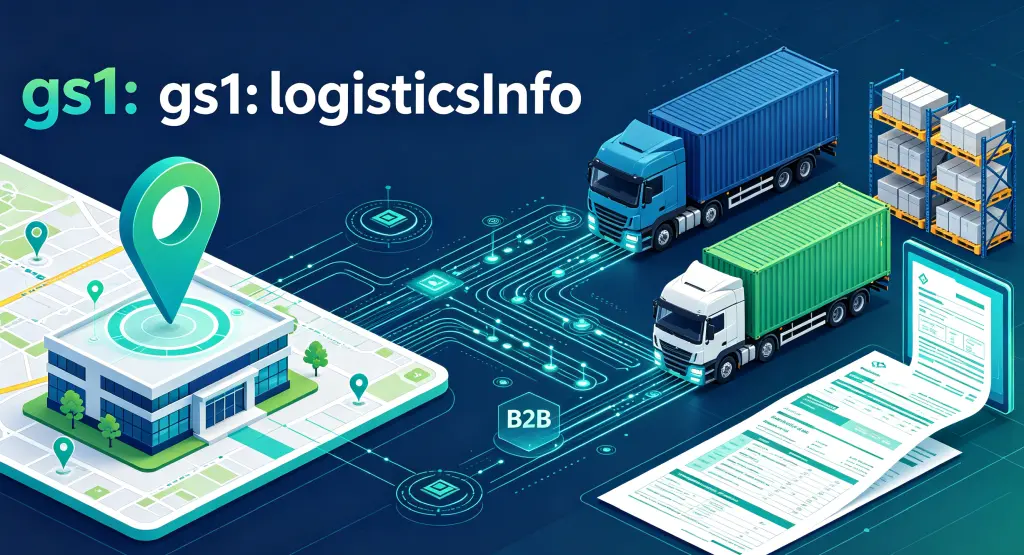
gs1:logisticsInfo is a link type in the GS1 Digital Link system, used to connect a physical location with its B2B logistics information. According to the official GS1 Web vocabulary definition, it is “a link to B2B logistics information related to a physical location.”
A quick note on the underlying idea behind GS1 Digital Link. The system converts GS1 identifiers — such as Global Location Numbers (GLN) and Series Shipping Container Codes (SSCC) — into standard Web URIs, so every physical entity — a location, a shipment, an asset — gets a persistent, resolvable web address. Through a compliant resolver, the same identifier can be connected to multiple different information sources.
gs1:logisticsInfo sits in that information-dispatch layer and plays the role of a “B2B logistics info entry point.” The page it points to typically contains logistics-operation information for a given physical location, and generally covers:
- Loading/unloading dock locations: specific bay numbers, vehicle staging areas
- Receipt/shipment time windows: appointment slots, cutoff times
- Vehicle routes in and out: on-site driving directions, height and width restrictions
- Point-of-contact people: warehouse dispatch, receiving manager contact details
- Required documents: delivery notes, packing lists, customs paperwork
How It Differs from gs1:locationInfo
Within the GS1 link-type family, gs1:logisticsInfo and gs1:locationInfo have clearly divided roles:
| Link type | Audience | Content focus |
|---|---|---|
gs1:locationInfo | Consumers, general visitors | Maps, directions, parking, accessibility |
gs1:logisticsInfo | B2B partners (drivers, carriers, suppliers) | Dock bays, time windows, access routes, document requirements |
One answers “how do I get there”; the other answers “what do I do once I arrive.”
2. Who It’s For
Drivers and Carriers
The traditional setup: a driver pulls up to a warehouse, can’t find the right dock, doesn’t know where to queue, and can’t reach dispatch — half the shift is spent looking for places and waiting for people. With gs1:logisticsInfo, scanning the warehouse’s GS1 code (linked to a GLN) gets the driver the dock location, queue area, and driving route directly; appointment windows and required documents are visible at a glance, so they don’t get turned away for missing paperwork; no more repeated phone calls to dispatch.
Warehouses and Distribution Centers
Drivers wandering around the yard, docks congested, appointment slots colliding, paper paperwork checked over and over — these are problems every warehouse has hit. With gs1:logisticsInfo, different carriers and different goods types can be routed to different dock bays; when a dock bay changes or a route is adjusted, the backend update is enough — no reprinting any signage; all logistics partners pull information through the same standard, which cuts down on communication gaps.
Suppliers and Buyers
Every customer has a different receiving process, and suppliers often have to remember a dozen delivery rules. The standardized link types in GS1 Digital Link let suppliers pull logistics requirements from different customers in the same way; routes, time windows, and document requirements are laid out clearly, which also reduces errors from information asymmetry.
Printed Info Goes Stale; What’s Behind the QR Code Doesn’t
In the traditional model, logistics info is printed on delivery notes, yard maps, or paper guides — once it’s printed, it’s fixed. Dock changes, temporary road closures, appointment-window shifts — none of that reaches the material that’s already been distributed.
With gs1:logisticsInfo, the QR code stays the same, but the logistics info behind it can be updated at any time. Change it once in the resolver backend, and every QR code already in circulation immediately points to the latest logistics guidance.
3. Real-World Use Cases
Case 1: A Large Distribution Center — Drivers Scan and Get an “Entry Guide”
A logistics company posts GS1 codes containing gs1:logisticsInfo at the entry, perimeter, and dispatch office of every distribution center (each linked to the warehouse’s GLN). When a driver arrives and scans, they see:
- Dock bay number and location: matched against the info on the delivery note
- Vehicle route inside the yard: one-way circulation, height and width limits
- Queue/waiting area: where to stage if the dock is occupied
- Required documents: delivery note, packing list, ID, and so on
Drivers spend noticeably less time “looking for the dock.”
Case 2: Fresh Cold Chain — Precise Communication of Time Windows and Temperature Requirements
A fresh-grocery e-commerce cold-storage warehouse has strict requirements for receiving times and temperature logging. The warehouse places GS1 codes on the docks and in its appointment system. Carriers scan to see:
- Appointment window: a receiving slot precise to 30 minutes
- Temperature-logger handoff: where to submit and who reviews
- Fast unloading lane: a dedicated priority dock for fresh goods
- Exception handling: who to contact if temperature goes out of range
Fresh produce depends heavily on unbroken cold chain. gs1:logisticsInfo keeps every carrier clear on time requirements and operating procedures.
Case 3: A Manufacturing Plant — A Standardized Interface for Supplier Deliveries
A large manufacturer receives deliveries from dozens of suppliers every day. Every supplier’s drivers are unfamiliar with the plant’s routes, docks, and document requirements. The company puts GS1 codes at the plant entrance and in purchase-order confirmation emails. Supplier drivers scan and get:
- Unloading zones by supplier: Supplier A goes to Dock 1, Supplier B to Dock 2
- Plant entry registration: where to check in, what ID to show
- Quality inspection handoff point: where QC-required materials are transferred
- Empty pallet return point: where to leave pallets after unloading
One QR code collapses what used to be a dozen separate procedures into a single workflow.
Case 4: Cross-Border Logistics — B2B Guidance at Ports and Bonded Warehouses
A cross-border e-commerce company uses GS1 codes at the entry of its bonded warehouse and around customs-supervised areas. Cross-border drivers and customs brokers scan to get:
- Customs inspection area: where goods destined for inspection should go
- Document submission window: where paper docs and electronic data are exchanged
- Route to the bonded warehouse: the fastest path from the port
- Multilingual guidance: automatic Chinese/English adaptation
Cross-border logistics involves many parties and complex regulatory flow. gs1:logisticsInfo provides operators of different roles and languages with a single, updatable entry point.
4. A Complete Configuration Example
Below is the data a logistics company configured for its Shanghai distribution center:
{
  "anchor": "/414/06933960552835",
  "itemDescription": "East China Distribution Center - Shanghai Warehouse",
  "defaultLinktype": "gs1:locationInfo",
  "links": [
    {
      "linktype": "gs1:locationInfo",
      "href": "https://locations.example.com/shanghai-dc",
      "title": "Distribution Center Location and Visitor Guide",
      "type": "text/html",
      "hreflang": ["zh-CN"],
      "context": ["visitor", "general"]
    },
    {
      "linktype": "gs1:logisticsInfo",
      "href": "https://logistics.example.com/shanghai-dc/arrival",
      "title": "Driver Entry Guide - Docks and Routes",
      "type": "text/html",
      "hreflang": ["zh-CN"],
      "context": ["carrier", "arrival"]
    },
    {
      "linktype": "gs1:logisticsInfo",
      "href": "https://logistics.example.com/en/shanghai-dc/arrival",
      "title": "Driver Arrival Guide - Docks & Routes",
      "type": "text/html",
      "hreflang": ["en"],
      "context": ["carrier", "arrival"]
    },
    {
      "linktype": "gs1:openingHoursInfo",
      "href": "https://locations.example.com/shanghai-dc/hours",
      "title": "Receiving Time Windows",
      "type": "text/html",
      "hreflang": ["zh-CN"],
      "context": ["carrier"]
    }
  ]
}
Field Reference
| Field | Meaning |
|---|---|
anchor | The resolver’s routing anchor. 414/ followed by a GLN indicates this is a location entity. |
defaultLinktype | The fallback link type. General visitors who scan are prioritized to gs1:locationInfo. |
linktype | The link type. Here it is gs1:logisticsInfo, i.e., a B2B logistics information link. |
href | The URL of the logistics information page, containing dock bays, routes, document requirements, etc. |
title | Link title, displayed by the resolver or scanning tools. |
type | Content type, typically text/html; PDF, JSON, and others are also supported. |
hreflang | Language adaptation. Returns the version matching the user’s language preference. |
context | Scenario tags, used to distinguish different uses (e.g., “driver arrival” vs. “visitor tour”). |
The Scan Flow
- A driver uses a GS1 Digital Link–capable scanner (phone camera, logistics app, etc.) to scan the QR code at the distribution center’s entry or dispatch office.
- The app requests
linkType=gs1:logisticsInfobased on user identity (driver vs. general visitor) or the user’s choice. - The scanner queries the GS1 resolver, which matches the best-fit link.
- The user is directed to the distribution center’s B2B logistics information page.
- The driver views the dock locations, driving routes, time windows, document requirements, and so on.
Why This Approach Works
- Simple code: The code itself contains only the GLN base path; all logistics info lives in the cloud.
- Selective delivery: The same QR code returns different content based on user identity (driver/visitor) and language (
hreflang). - Editable: Dock changes and route updates happen only in the backend — no reprinting needed.
- Composable: Works alongside
gs1:locationInfo, so visitors see the map and drivers see the logistics guide. - Measurable: The resolver backend can track access data for each
gs1:logisticsInfolink.
In Closing
gs1:logisticsInfo is the link type in the GS1 Digital Link system designed specifically for B2B logistics operations. Together with the consumer-facing gs1:locationInfo, one handles “how to get there” and the other handles “what to do once you’re here” — and between them they cover the entire journey from navigating to the gate to completing the loading or unloading.
Distribution centers use it to hand drivers an entry guide on demand; cold-chain warehouses use it to communicate time windows and temperature requirements; manufacturers use it to collapse a dozen supplier workflows into one; cross-border logistics uses it to leave a unified entry point for multi-party coordination. The QR code is fixed; the information behind it stays alive — and that is where GS1 Digital Link’s real advantage lies.