1. What Is GS1:leaveReview
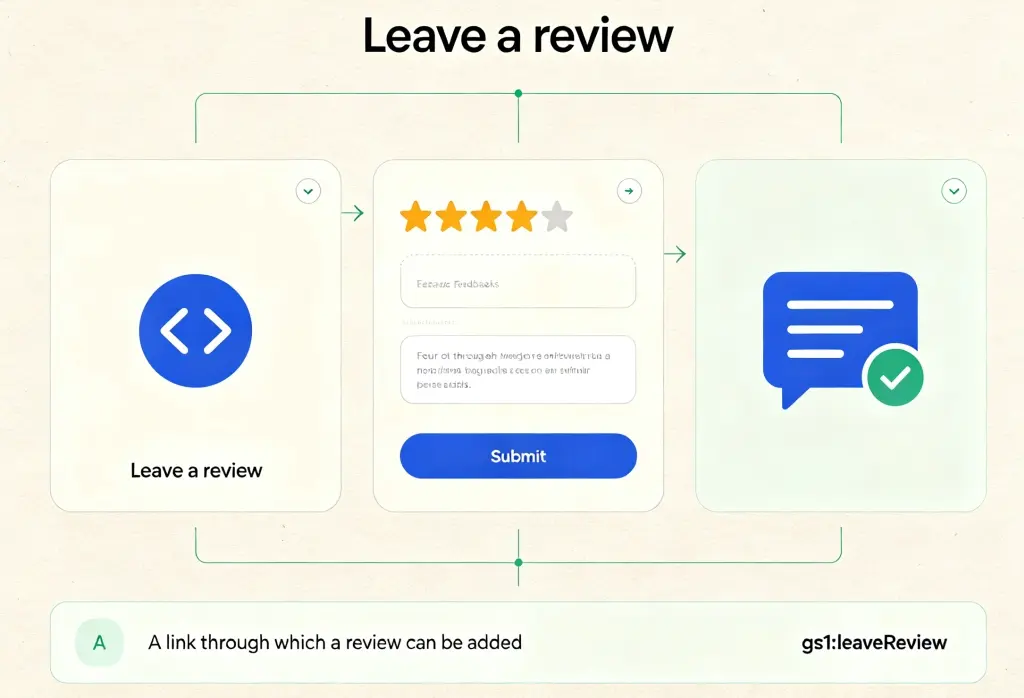
gs1:leaveReview is one of the standardized link types in GS1 Digital Link, used to guide users to a product review page. Per the GS1 official vocabulary definition, it is “a link through which a review can be added.”
The basic idea behind GS1 Digital Link: GS1 identifiers like GTIN are converted into standard Web URIs, giving every product a resolvable network address. The same identifier can point to multiple information sources.
gs1:leaveReview does one specific thing: it provides an entry point for leaving a review. The page it points to typically contains a form where users can submit their review — this could be a review page on the brand’s official site, a submission interface on a third-party review platform, or a retailer’s product review system.
Difference from gs1:review
| Link Type | Function | Typical Content |
|---|---|---|
gs1:leaveReview | Write a review | Review form, star rating, text input, submit button |
gs1:review | View reviews | Published user reviews, rating summary |
In short: gs1:leaveReview is the entry for writing a review, and gs1:review is the entry for reading reviews. They complement each other — consumers first use gs1:review to check others’ opinions before buying, then use gs1:leaveReview to share their own experience after using the product.
2. Why Use It
2.1 Turn “Wish to Share” into “Actual Action”
Most consumers feel inclined to share feedback after using a product, but very few actually follow through. The reason is usually simple: they can’t find the review entry — either they have to search for the product on a third-party platform, or hunt for a “Write a Review” button through multiple menus on the brand’s website.
gs1:leaveReview embeds the review entry directly on the product. One scan takes consumers straight to the review page — no search, no login, no memorizing URLs. This one-step access turns the willingness to give feedback into actual action.
2.2 Collect Real, Timely User Feedback
User reviews are one of a brand’s most valuable assets. They’re not only a purchasing reference for other consumers, but also direct evidence for product improvement and service optimization.
With gs1:leaveReview, brands can reach users during the “golden feedback window” — right after they’ve used the product. At this point, the experience is fresh, and reviews are the most genuine and specific. The feedback collected is more timely and actionable.
2.3 Building Brand Credibility
In an era where consumers increasingly rely on online reviews to make purchase decisions, a brand that offers “nowhere to review” is often seen as “not transparent” or “not confident.” gs1:leaveReview sends a clear signal: “We welcome your feedback; we value your voice.” This openness helps build trust.
2.4 The Review Entry Never Goes Stale
Traditional approaches — printing “Scan to review” on packaging but pointing to a fixed URL — break down when the brand changes its review system or updates the review page URL. The links printed on existing packaging become dead ends.
With gs1:leaveReview, the QR code stays the same, but the URL behind it can be updated anytime in the resolver backend. Review system upgrades, page redesigns, even switching review service providers — one cloud update, and every QR code on existing packaging points to the latest review entry.
2.5 One Code, Multiple Uses
The core strength of GS1 Digital Link is “one code, multiple uses.” The same QR code serves different users in different scenarios:
- Regular consumers scan → view product details (
gs1:pip) - Users who want to review scan → go straight to the review form (
gs1:leaveReview) - Users curious about word-of-mouth scan → see existing reviews (
gs1:review)
3. Typical Use Cases
Case 1: CPG Brand — From Buyer to Reviewer
A craft brewery prints GS1 QR codes with gs1:leaveReview on every bottle. Consumers who like the beer scan and go straight to the review page:
- Star rating: 1 to 5 stars
- Taste evaluation: bitterness, aroma, body, aftertaste
- Written comments: share their tasting experience and why they recommend it
- Upload photos: share pictures with the beer
Reviews are captured at the moment when the experience is freshest, and the brand receives the most genuine, timely feedback.
Case 2: Retail — Online-Offline Review Loop
A retail brand with both online and physical presence prints GS1 QR codes with gs1:leaveReview on product tags. After buying in-store, consumers scan at home:
- Confirm the purchased item (GTIN auto-matched)
- Write a review and star rating
- Upload usage photos or videos
- View other users’ reviews
This “buy offline, review online” flow turns offline traffic into online word-of-mouth assets.
Case 3: Smart Home & Electronics — Feedback After Use
A smart home brand prints GS1 QR codes with gs1:leaveReview on product packaging and manuals. After installing and using the product for a while, consumers scan:
- Evaluate ease of use (easy to install? intuitive app?)
- Evaluate performance (connection stability, response speed)
- Evaluate design quality (appearance, materials)
- Submit improvement suggestions and feature requests
Smart home experiences take time to fully form. gs1:leaveReview lets brands collect feedback after consumers have built a complete impression — providing valuable first-hand data for product iteration.
Case 4: B2B Industrial Products — Technical Reviews from Professional Users
A precision instrument manufacturer prints GS1 QR codes with gs1:leaveReview on every device. After using the equipment for a while, engineers at the customer company scan:
- Evaluate technical performance (accuracy, stability, efficiency)
- Evaluate operational experience (interface friendliness, learning curve)
- Evaluate reliability (failure rate, maintenance frequency)
- Submit technical improvement suggestions
In B2B contexts, deep reviews from professional users have high value for product iteration and customer acquisition. gs1:leaveReview provides a standardized channel for ongoing professional feedback.
4. Full Usage Example
Here is a JSON example of a CPG brand configuring gs1:leaveReview in a GS1-compliant resolver:
{
  "anchor": "/01/06933960552835",
  "itemDescription": "CloudBrew IPA 330ml",
  "defaultLinktype": "gs1:pip",
  "links": [
    {
      "linktype": "gs1:pip",
      "href": "https://www.example.com/product/12345",
      "title": "Product Detail Page",
      "type": "text/html",
      "hreflang": ["zh-CN"],
      "context": ["general"]
    },
    {
      "linktype": "gs1:leaveReview",
      "href": "https://reviews.example.com/submit/12345",
      "title": "Leave a Review - Share Your Experience",
      "type": "text/html",
      "hreflang": ["zh-CN"],
      "context": ["feedback", "rating"]
    },
    {
      "linktype": "gs1:leaveReview",
      "href": "https://reviews.example.com/en/submit/12345",
      "title": "Leave a Review - Share Your Experience",
      "type": "text/html",
      "hreflang": ["en"],
      "context": ["feedback", "rating"]
    },
    {
      "linktype": "gs1:review",
      "href": "https://reviews.example.com/list/12345",
      "title": "View User Reviews",
      "type": "text/html",
      "hreflang": ["zh-CN"],
      "context": ["reputation"]
    }
  ]
}
Field Descriptions
| Field | Meaning |
|---|---|
anchor | Router anchor, corresponding to the GTIN. When a scan hits this path, the resolver looks for matching rules. |
defaultLinktype | Default fallback link type, used when no specific rule matches. |
links | Core rules array; multiple links can be configured. |
linktype | Link type; here it is gs1:leaveReview. |
href | URL of the review page, typically containing a review form (star rating, text input, image upload, etc.). |
title | Link title for display in tools. |
type | Content type, typically text/html. |
hreflang | Language preference; returns the corresponding language version. |
context | Context tags for refining routing rules. |
User Scanning Flow
- Scan: Consumer scans the GS1 QR code on the product using a GS1 Digital Link–capable tool (phone camera, WeChat, etc.).
- Select Link: The scanner or app selects
linkType=gs1:leaveReviewbased on user intent (e.g., the user clicks a “Write a Review” button). - Resolve: A request is sent to the GS1 resolver, which matches the appropriate link.
- Redirect: The user is directed to the brand’s review form page.
- Submit Review: The user fills in star rating, written comments, uploads images, and submits.
Advantages
- Minimal QR code: Only contains the base path; the review URL lives in the cloud.
- Dynamic routing: Returns the Chinese or English review page based on
hreflang. - No re-printing: Review system upgrades or page redesigns are updated in the backend only.
- Multiple links coexist: The same GTIN can carry both
gs1:leaveReview(write) andgs1:review(read) for different user needs. - Data analytics: The resolver backend tracks visits to each
gs1:leaveReviewlink, helping brands see how the review feature is actually used.
Summary
gs1:leaveReview directly serves user feedback collection. It turns the question “What do users think?” into a directly reachable entry point. The product page answers “what is this,” the instructions page answers “how to use it” — gs1:leaveReview answers the question brands care about most after product delivery.
CPG brands turn buyers into reviewers, retail brands close the online-offline review loop, smart home brands collect feedback after use, B2B brands gather ongoing technical reviews — across industries, gs1:leaveReview provides a standardized way to collect user feedback. One scan, and the conversation with users begins.