1. What is gs1:eventsInfo?
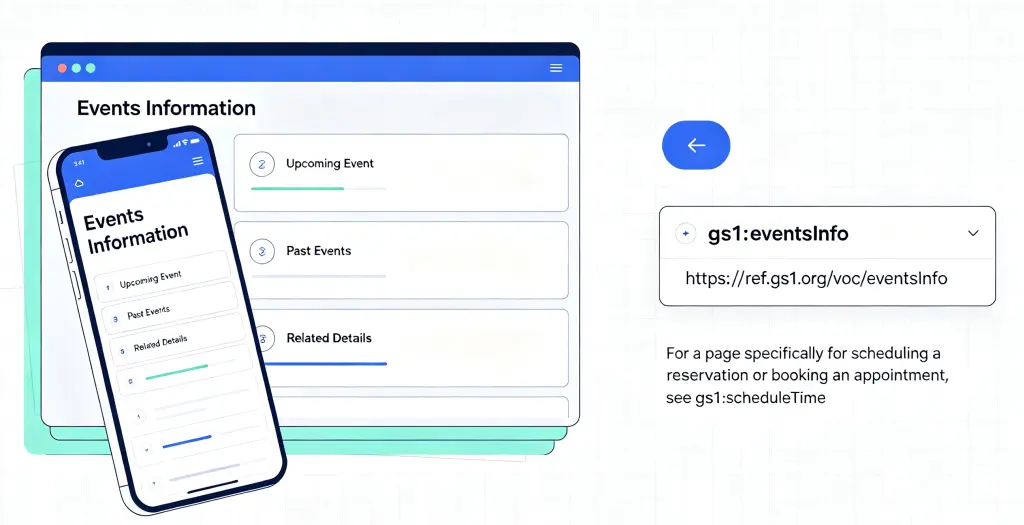
gs1:eventsInfo is one of the standard link types in GS1 Digital Link, specifically designed to connect an entity with its related event information. According to the GS1 Web Vocabulary, it is defined as: “A link to event details.”
To understand gs1:eventsInfo, you first need to know the basic idea behind GS1 Digital Link: converting GS1 identifiers — such as GTIN (Global Trade Item Number), GLN (Global Location Number), GSRN (Global Service Relation Number), etc. — into standard Web URIs, giving every physical entity (product, location, asset, organization, etc.) a persistent network address. Through a compliant resolver, the same entity can be connected to multiple different information sources.
gs1:eventsInfo serves as the “event information entry point” in this information distribution layer. The page it points to typically contains event details associated with a particular entity — which could be a brand’s product launch, a retail store’s promotional event, a factory open day, a healthcare institution’s wellness seminar, or a cultural venue’s exhibition or performance.
Difference from gs1:scheduleTime
Within the GS1 link type system, gs1:eventsInfo and gs1:scheduleTime have clearly defined roles:
| Link Type | Function | Typical Content |
|---|---|---|
gs1:eventsInfo | Provides event detail information | Event description, time and location, guest lineup, agenda, participation methods, etc. |
gs1:scheduleTime | Supports booking and reservation operations | Booking forms, seat selection, time slot selection, reservation confirmation, etc. |
In short: gs1:eventsInfo is “telling you what the event is,” while gs1:scheduleTime is “letting you book or reserve directly.” The two can work together — users first learn about the event through gs1:eventsInfo, then complete the booking through gs1:scheduleTime.
2. Why Use It
2.1 Making Event Information Readily Available
Traditional event promotion typically relies on brand websites, social media, or third-party event platforms. Consumers need to actively search, follow official accounts, or download apps to get information. gs1:eventsInfo embeds the event information entry point directly into the product itself — consumers can learn about events related to the brand or product while scanning to make a purchase.
On the box of a limited-edition sneaker, scanning reveals the brand’s launch event information; on the label of a craft beer, scanning reveals the brand’s participation in a beer festival; on a concert ticket, scanning reveals the complete performance details. Event information doesn’t need to be sought out by consumers — it comes to them with the product.
2.2 Improving Event Participation and Conversion
When event information reaches the people most interested in the brand or product, participation rates and conversions naturally improve. gs1:eventsInfo allows brands to push event information to consumers who have already purchased related products — people who already have interest and trust in the brand and are the most likely to participate in brand events.
Combined with gs1:scheduleTime, brands can enable consumers to complete reservations or registrations right after learning about the event, shortening the path from “interested” to “participating.”
2.3 Information Always Up to Date
Traditional event promotional materials — posters, flyers, packaging — are fixed once printed. If the event time, location, or content changes, already-printed materials cannot be modified.
With gs1:eventsInfo, the QR code is fixed, but the event information behind it can be updated at any time. Event postponements, venue changes, new guests — all information syncs to the cloud in real time, without reprinting any materials.
2.4 One Code, Multiple Uses
One advantage of GS1 Digital Link is that a single code can serve different roles:
- Consumers scan → learn about event details, view agenda, register to participate
- Partners scan → access business cooperation information for the event
- Media scan → access press kits and media contact information
No need to print multiple QR codes — one code connects to different information entry points.
2.5 Reducing Event Marketing Material Costs
Brands no longer need to design, print, and distribute promotional materials separately for each event. With gs1:eventsInfo, brands only need to use a unified GS1 QR code on existing product packaging, hang tags, or in-store materials. All event information is configured and updated in the cloud. This reduces the material costs and information maintenance costs of event marketing.
3. Typical Use Cases
Use Case 1: Consumer Brands — Product as Event Entry Point
A craft beer brand prints a GS1 QR code containing gs1:eventsInfo on the label of every product. After purchasing the beer, consumers can scan to see various events the brand is participating in or hosting:
- Beer festival events: time, location, participating brand lineup, on-site activity schedule
- Tasting sessions: tasting time, location, registration method, tasting menu
- Brewery open days: visiting hours, reservation method, tour content
While enjoying the beer, consumers learn about the brand’s events and go from “beer buyers” to “event participants,” with brand loyalty increasing as a result.
Use Case 2: Retail Stores — Scan to Know In-Store Events
A large supermarket chain posts GS1 QR codes containing gs1:eventsInfo (linked to the store’s GLN) on shelves and at checkout counters. Customers can scan to view the store’s upcoming events:
- Tasting events: time, product categories, participating brands
- Member day promotions: event time, discount levels, participating categories
- Family activities: activity content, time, registration method
Customers can learn about store events while shopping, making the shopping experience richer and increasing average transaction value and repurchase rates.
Use Case 3: Cultural Venues — Exhibits as Event Guides
A museum prints GS1 QR codes containing gs1:eventsInfo on the description plaque of every exhibit. Visitors can scan to view event information related to that exhibit:
- Guided tours: tour times, meeting points, languages available
- Expert lectures: lecture topics, speakers, times, registration methods
- Workshops: activity content, suitable ages, registration methods
Exhibits are no longer just objects to “look at” — they also become entry points for learning about venue events, making the visitor experience richer and more in-depth.
Use Case 4: Sports and Entertainment — Tickets as Event Portals
A music festival ticket is printed with a GS1 QR code containing gs1:eventsInfo (linked to the ticket’s GSRN or serial number). Ticket holders can scan to view:
- Complete performance lineup: artist list, performance schedule, stage distribution
- On-site service information: food and beverage locations, medical stations, restroom locations
- Real-time announcements: weather alerts, schedule changes, special notices
The ticket goes from being an “entry credential” to a complete event service portal, significantly improving the audience’s on-site experience.
4. Complete Configuration Example
Below is a JSON example of a consumer brand configuring gs1:eventsInfo link data in a GS1 resolver for one of its products:
{
  "anchor": "/01/06933960552835",
  "itemDescription": "Cloud Brew Craft Beer - IPA 330ml",
  "defaultLinktype": "gs1:pip",
  "links": [
    {
      "linktype": "gs1:pip",
      "href": "https://www.example.com/product/12345",
      "title": "Product Detail Page",
      "type": "text/html",
      "hreflang": ["zh-CN"],
      "context": ["general"]
    },
    {
      "linktype": "gs1:eventsInfo",
      "href": "https://events.example.com/brewery/upcoming",
      "title": "Brand Events - Tastings & Festivals",
      "type": "text/html",
      "hreflang": ["zh-CN"],
      "context": ["consumer", "promotion"]
    },
    {
      "linktype": "gs1:eventsInfo",
      "href": "https://events.example.com/en/brewery/upcoming",
      "title": "Brand Events - Tastings & Festivals",
      "type": "text/html",
      "hreflang": ["en"],
      "context": ["consumer", "promotion"]
    },
    {
      "linktype": "gs1:scheduleTime",
      "href": "https://events.example.com/brewery/tasting/booking",
      "title": "Book a Tasting Session",
      "type": "text/html",
      "hreflang": ["zh-CN"],
      "context": ["booking", "reservation"]
    }
  ]
}
Configuration Field Descriptions
| Field | Description |
|---|---|
anchor | The resolver’s routing anchor, corresponding to the GTIN. Once a scan request hits this path, the resolver begins matching link rules |
defaultLinktype | Default fallback link type. Redirects when no specific condition is matched (usually the product detail page) |
links | Array of link rules; multiple entries can be configured |
linktype | Link type. Here it is gs1:eventsInfo, indicating an event details information link |
href | The event details page URL, containing event description, time, location, agenda, etc. |
title | Link title for display by the resolver or scanning tool |
type | Content type, usually text/html |
hreflang | Language adaptation. Returns the corresponding language version of the event page based on the user’s browser language preference |
context | Context tags for granular distribution (e.g., distinguishing “consumer events” from “business events”) |
User Scanning Flow
- Scan: Consumers use a GS1 Digital Link-compatible scanning tool (smartphone camera, WeChat, etc.) to scan the GS1 QR code on the product packaging.
- Resolve: The scanning tool sends a request to the GS1 resolver, which matches the appropriate link based on parameters (e.g.,
linkType=gs1:eventsInfo). - Redirect: The user is directed to the brand’s pre-configured event details page.
- Browse and Participate: The user views the event description, time and location, and participation methods, and can click the
gs1:scheduleTimelink to complete a reservation or registration.
Key Benefits
- Minimal QR code: The code only contains the base path (e.g.,
/01/06933960552835); all event information is configured in the cloud. - Dynamic dispatch: The same code automatically returns the Chinese or English version of the event page based on
hreflang. - Always updatable: When event time, location, or content changes, only the backend needs to be updated — no need to reprint packaging or materials.
- Booking integration: Can be used together with
gs1:scheduleTimeto achieve a “learn details → book/register” flow. - Data traceability: The resolver backend can track access data for each
gs1:eventsInfolink, helping brands understand the traffic-driving effectiveness of different events.
Summary
gs1:eventsInfo is a practical link type in the GS1 Digital Link system. What it does is straightforward — it binds products, locations, organizations, and event information in a single QR code, so scanning takes you directly to the event details page.
The product information page answers “what is this product?” — the brand portal answers “who is this brand?” — gs1:eventsInfo answers “what events can I participate in?” It extends the static product consumption experience into a dynamic brand interaction experience.
For consumer brands, retail stores, cultural venues, and sports and entertainment organizers, gs1:eventsInfo provides a standardized way to distribute event information — print the packaging once, and let the event information iterate along with the product.